Configuring Activity Rules
With rules you define how the hierarchy of activities is structured. This means, for example, which activity type or activity type group can be used as root element and how other activity types and activity type groups can be arranged below it.
Example
Let's assume that you have created the following three activity type groups and assigned the activity types to them:
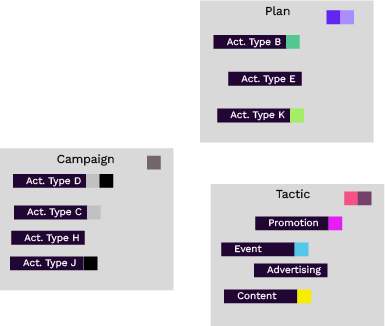
Now you want to define that the activity types of the Plan group can be created as root elements, the activity types of the Campaign group as descendants. The activity types of the Tactic group should only be available as descendants of the Campaign group:
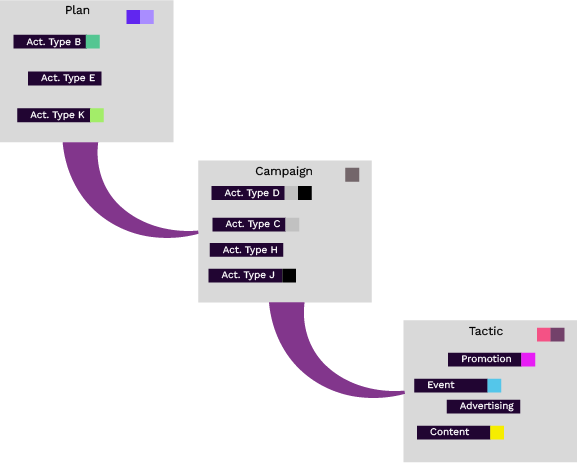
You define these relationships, shown in the previous image with the purple connections, by rules. Note that the rule always states who is parent in the hierarchy, shown here by the wider part of the link.
Activity Rules: The Basics
-
A rule always specifies the relationship between a parent and a child.
-
In any rule, both activity types and activity type groups can serve as either the parent or the child in the relationship.
-
There is no limit on the number of rules you can set up.
-
Any activity type or type group can have one or multiple parents. Assigning a type or type group to multiple parents is useful if you need to create a complex hierarchy design, or if you want to make adjustments to the way your hierarchy works (for example, from one plan year to the next).
-
You can't create a rule where the same attribute is attached to both the parent and child activity types or type groups. This is because child activities inherit the attributes and their values from activities above them in the hierarchy. To avoid an activity having multiple values for the same attribute, any attribute can only appear once in the hierarchical path (that is, it can only appear on one activity type or type group on a branch of the hierarchy).
-
You can't create a rule that would result in a circular relationship. For example: say you have created a rule where Group A is the parent of Group B. This means that you can't create another rule by which Group B (or an activity type in Group B) can become a direct parent of Group A (or an activity type in Group A).