SSO Bypass
If login via SSO is activated in your system, all users (except system administrators) must currently use the SSO login. In future, administrators will be able to set exceptions for individual users using the so-called SSO bypass.
The SSO bypass can only be activated on the User Profile page:
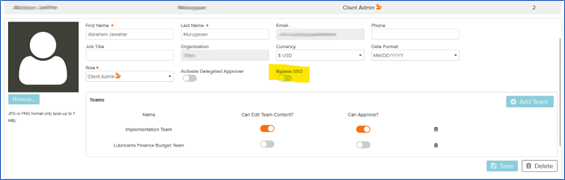
Note that the switch is only visible if login via SSO is activated for a system. To prevent users from changing this setting themselves, the switch is not displayed on the My Account page; by default, the setting is deactivated for all users.
 What Happens if the SSO Bypass Is Activated
If the setting is activated for a user, the following happens:
-
The user receives an e-mail with a link to set a new password, similar to the Forgot Password e-mail.
-
The user sets their password.
-
Afterwards, the user logs into Hive9 using their credentials.
If the SSO Bypass Is Deactivated
If the setting is deactivated again for a user, the following happens:
-
The user receives an e-mail with instructions to log in with their SSO credentials.
-
The user uses their own SSO URL to log into Hive9.